Enterprise Knowledge AI
Find the answer. Keep the source.
Search company knowledge with citations, permission-aware retrieval and an explicit route to human review.
We connect company knowledge, operational data and everyday workflows to useful software — from technical support copilots to production intelligence and AI-assisted solution design.
Applied AI, explored through working concepts.
Knowledge with context.
Useful where work happens.
An appropriate data boundary.
People own the decisions.
Explore the concepts
Three operational questions.
Three practical starting points.
Concept 01 · PByte / AI Lab
The right knowledge. At the point of service.
The answer is often there — scattered across manuals, past tickets and the memory of your most experienced engineer.
Bring technical documents, machine context and service history into one source-backed workspace. Help a technician find a useful starting point, then keep an engineer in control.
Inside the concept Web application design
01 / 03Illustrative interface concepts, not released products. Fictional data; diagrams and charts are illustrative, not validated engineering results.
Interactive case · fictional data
Line 02 has stopped. Pick up the case, compare the evidence and prepare the engineer’s handover.
Technician’s question
Machine reports feeder position error E142. What should I check?
Start with the context,
not an assumption.
The mock evidence groups possible causes into calibration drift, sensor contamination, a communication timeout or an incorrect setup. A qualified engineer needs to determine which, if any, applies.
Suggested review checklist
Illustrative content only — not equipment instructions. Follow approved documentation and authorised service procedures.
The workflow
Potential value: faster diagnosis, less dependence on a single expert and service knowledge that stays with the team.
A production implementation would retrieve permission-scoped passages and related service records, attach citations and route uncertain or consequential decisions to an authorised engineer. This demo uses prewritten, fictional evidence; it does not diagnose equipment.
Concept 02 · PByte / AI Lab
See the line. Understand the story.
Production dashboards show what happened. Finding why still means piecing together events, shift notes and maintenance records.
Connect production signals with operational context. Ask a focused question, trace the supporting events and give your team a clearer next step.
Inside the concept Web application design
01 / 03Illustrative interface concepts, not released products. Fictional data; diagrams and charts are illustrative, not validated engineering results.
Production overview
Fictional plant · fixed shift snapshot, not a live feed
Line 02 · process sequence
Investigation brief
Between 09:42 and 11:10, feeder-related interruptions on the placement station coincided with lower Line 2 performance. Downstream stations then spent 17 minutes waiting for boards.
EvidencePlacement event log · MES output plan · shift context
Investigate feeder positions 24 and 31, and compare their alarm history with yesterday. Confirm the cause with the shift engineer.
The workflow
Potential value: quicker shift reviews, clearer bottleneck investigations and better-informed maintenance priorities.
A real system would normalise machine and MES events, align timestamps and combine them with product, shift and maintenance context. Correlation suggests where to investigate; it is not proof of causation. Values below are a fixed fictional snapshot, not live telemetry.
Concept 03 · PByte / AI Lab
From a rough requirement to a reasoned starting point.
An RFQ arrives as a document. Turning it into a solution means extracting constraints, finding gaps and making assumptions visible.
Structure the brief, explore a possible architecture and prepare an engineer-reviewed proposal draft — with the open questions still in view.
Inside the concept Web application design
01 / 03Illustrative interface concepts, not released products. Fictional data; diagrams and charts are illustrative, not validated engineering results.
Analyze the sample to see structured requirements, a possible process architecture and the questions an engineer still needs to answer.
The workflow
Potential value: a more consistent first response, fewer missed requirements and more engineering time spent on the decisions that matter.
A production implementation could extract requirements from documents and match them to a maintained capability catalogue. This browser demo only reads labelled text fields and shows a generic reference architecture. It does not use an AI model, calculate capacity, select a vendor or validate an engineering solution.
Beyond the examples
Different workflows need different tools. These capabilities can be combined around the job that actually needs doing.
Find the answer. Keep the source.
Search company knowledge with citations, permission-aware retrieval and an explicit route to human review.
Move the work forward.
Triage requests, gather context, classify documents and prepare reports or drafts. Require approval before consequential actions.
Give unstructured work a structure.
Extract and organise information from RFQs, service forms, invoices, specifications and inspection reports.
Choose the right operating boundary.
Evaluate cloud, private-cloud or on-premises options against your data, model, security and operational requirements.
The system behind the experience
Connect the right sources. Add retrieval, models and rules. Put the result into a tool your people can actually use.
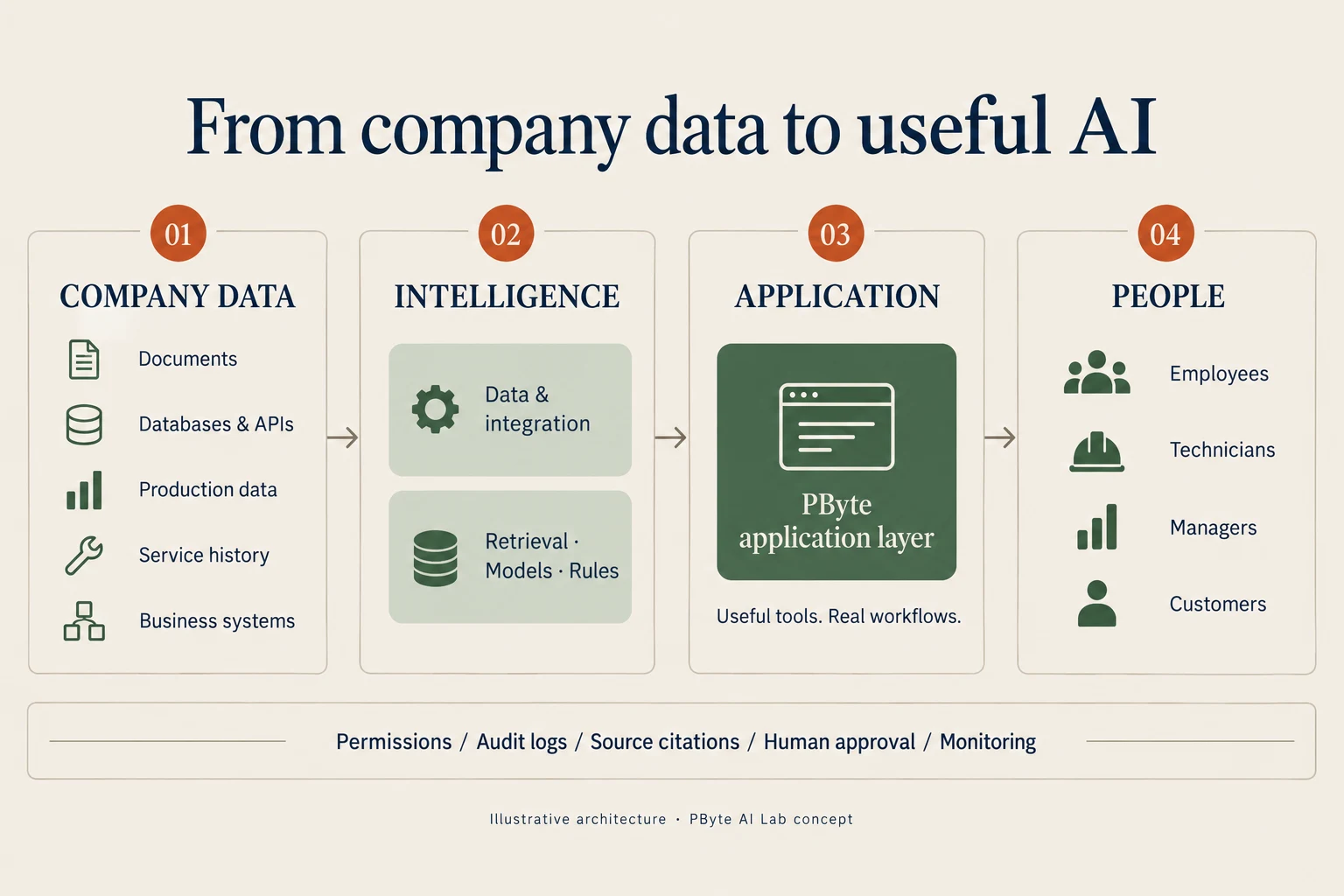
Across every layer: authentication, permissions, audit logs, source citations, human approval and monitoring.
How we work
Start with a specific bottleneck and the people who own it.
Understand sources, quality, access and operational context.
Test one useful path with your team and representative data.
Evaluate usefulness, failure modes, security and reliability.
Fit the tool to daily work, with monitoring and ownership.
Useful means accountable
A good AI system should show where information came from, make uncertainty visible and involve people when a decision matters.
Start with a real question
Show us the process, the data and the bottleneck.
We’ll explore where AI could genuinely help.